

Benefits of Tactile Controls on Gadgets: A 2026 Guide
Table of Contents
- Why Physical Buttons Are Making a Comeback in 2026
- The Core Benefits of Tactile Controls on Gadgets
- Tactile vs. Touchscreen: A Direct Comparison
- Accessibility Benefits of Tactile Interfaces for All Users
- Why Tactile Switches Are Better for Gaming
- Cognitive Load and Emotional Satisfaction
- Durability, Hygiene, and Sustainability
- How to Choose Gadgets with Great Tactile Controls
- Frequently Asked Questions
Last Updated: September 12, 2026
Why Physical Buttons Are Making a Comeback in 2026
The benefits of tactile controls on gadgets have returned to the center of design conversations, and the reason is simpler than most people expect. After roughly a decade of touchscreen-first thinking, drivers, gamers, and everyday users are pushing back against interfaces that demand constant visual attention. This guide from Electro Gift Shop examines why physical controls are winning again, where they genuinely outperform glass, and how to pick gadgets that get the balance right.
Touchscreens solved a real problem: they made devices flexible and cheap to update. But they created a new one. Every swipe, tap, and long-press requires you to look at the screen, and that visual demand adds up across a day of use.
Physical controls change that equation. A button has a fixed position, a defined travel distance, and a click you can feel. Your thumb learns it in a week and never forgets.
That's the core argument here: tactile controls aren't nostalgia, they're an interface decision with measurable consequences for accuracy, safety, and satisfaction.
The Core Benefits of Tactile Controls on Gadgets
Tactile controls deliver three things touchscreens struggle to match: confirmation you can feel, accuracy without looking, and lower mental effort during routine tasks. Each benefit compounds the others, which is why the advantages show up across so many device categories.
Sensory Confirmation and Input Accuracy
Tactile feedback is the physical response a control gives when you press it: a click, a detent, a resistance curve. That response confirms the input registered before you see anything on a display. A common mistake manufacturers make is designing a button with mushy travel and no audible click, which removes the confirmation entirely and forces users back to the screen to verify.
Mechanical switches also reduce accidental presses. A touchscreen target can be triggered by a brush of the palm; a switch with a defined actuation force requires deliberate pressure. For controls used dozens of times a day, that difference in input validation matters more than any spec sheet suggests.
Blind Operation and Safety
Blind operation means using a device without looking at it, and it's where tactile controls are unbeatable. Volume knobs, camera shutters, and power switches with distinct shapes can all be found by feel alone.
The safety implication is obvious in cars, but it extends further. Someone adjusting earbuds mid-run or a cyclist changing a light mode shouldn't need to stop and stare at a screen. Physical controls let the task happen in the background while attention stays on the road, the trail, or the conversation.
Tactile vs. Touchscreen: A Direct Comparison
Tactile controls win on accuracy, blind operation, and durability, while touchscreens win on flexibility, screen real estate, and cost of redesign. The right answer depends on how often the control is used and whether the user can afford to look at it.
| Factor | Tactile Controls | Touchscreen Interface |
|---|---|---|
| Input accuracy | High, with physical detents | Depends on target size |
| Blind operation | Native | Requires practice |
| Accidental presses | Rare | Common |
| Reconfigurability | Fixed function | Fully software-defined |
| Cleanability | Gaps around buttons | Flat, easy to wipe |
| Emotional valence | Often positive | Neutral to frustrating |
| Repair outlook | Switches are replaceable | Panel failure is costly |
The trade-off is real. A control panel of physical buttons can't be redesigned with a firmware update, and every switch adds a hole for dust and moisture to find. That's why the best modern gadgets hybridize: a screen for menus, physical controls for the functions you touch constantly.
Accessibility Benefits of Tactile Interfaces for All Users
The accessibility benefits of tactile interfaces extend far beyond any single user group, and they are the most under-covered angle in the entire tactile-controls conversation. Most articles treat accessibility as a footnote. In practice, it is where tactile design delivers its clearest, most measurable wins.
For people with visual impairments, physical controls are often the difference between a usable device and an unusable one. Screen readers can announce a menu, but they cannot help you find a flat glass surface with no landmarks. A blind user navigating a portable speaker needs a power switch they can locate by shape, a volume control with a tactile end stop, and a play button with a distinct bump. Those features cost manufacturers almost nothing and transform device usability.
The design vocabulary here is well established. Tactile markers (raised bars or dots on a key) let a finger identify a control without sight. Detents (the notched resistance you feel as a dial clicks through positions) give a volume knob discrete, countable steps. Shape coding (making the power button a different size or texture from the skip button) lets users distinguish controls by feel alone. None of these require exotic engineering; they require a decision to design for touch first.
The same choices help users with reduced fine motor control, a group that grows with age. A touchscreen demands a precise, steady tap on a small target. A physical button with a generous actuation area and a clear click tolerates tremor, stiffness, and imprecise aim. For someone with arthritis or a hand injury, that difference is not a convenience; it is the difference between operating a device independently and needing help.
Gloves are another accessibility case hiding in plain sight. Capacitive touchscreens depend on the electrical conductivity of bare skin, which is why winter gloves, work gloves, and medical gloves often fail to register taps (w3.org). A mechanical switch does not care what is covering your finger. For outdoor workers, cyclists, and anyone in a cold climate, tactile controls are the only reliable interface for months of the year.
One-handed operation ties these threads together. A well-placed physical control can be found and actuated by feel while the other hand is occupied, whether that hand is holding a child, a leash, or a handrail. Touchscreens force a visual check and often a second hand.
Web Content Accessibility Guidelines (WCAG) on target size and input modality
Why Tactile Switches Are Better for Gaming
Why tactile switches are better for gaming comes down to latency and feedback loops. Competitive players need to know an input registered in milliseconds, and a mechanical switch with a short actuation distance delivers that confirmation faster than a capacitive touch surface.
Input latency is the delay between your action and the device's response. Mechanical switches typically actuate before the button bottoms out, which shaves precious milliseconds off every command. In genres where a single frame decides an outcome, that margin compounds over a session.
There's a cognitive dimension too. When your fingers receive haptic response from a key, your brain stops allocating attention to verifying the press. That frees working memory for the actual game. Touchscreen controls on handheld devices force players to glance down, breaking immersion and costing reaction time.
The trade-off: mechanical switches wear out and can develop inconsistent feel across a keyboard. Good ones last for millions of presses, but budget switches sometimes develop chatter, where a single press registers twice.
Cognitive Load and Emotional Satisfaction
Cognitive load analysis explains why physical controls feel better, not just work better, and it is the scientific backbone most articles skip. Every interface interaction consumes attention, and the type of attention matters. Touchscreens charge a visual attention tax because they require you to look, locate, and confirm. Physical controls offload that work to muscle memory, which operates below conscious thought.
The mechanism is straightforward. When you press a button and feel a click, your brain receives confirmation through the same motor pathway that issued the command. There is no gap between action and feedback, so no separate verification step is needed. On a touchscreen, the command goes out through your finger but the confirmation comes back through your eyes. That mismatch forces a look, and that look is the cost.
Human factors researchers describe this as the difference between closed-loop and open-loop control. A closed-loop interaction gives continuous feedback during the action, so the user can adjust in real time. An open-loop interaction gives feedback only after the action completes, forcing the user to check the result. A physical dial is closed-loop: you feel the resistance and the detents as you turn. A touchscreen slider is open-loop: you drag, then look to see where it landed. Closed-loop control is faster, more accurate, and less mentally taxing, which is why pilots, surgeons, and audio engineers still reach for knobs.
Emotional valence matters too, and it is not just aesthetics. The satisfying click of a well-tuned switch produces a small positive response that users associate with quality and reliability. That association is learned through repetition: a control that confirms every press builds trust, while a control that sometimes fails to register builds low-grade anxiety. Over months of use, that anxiety accumulates into a feeling that the device is unreliable, even when its core function works fine.
This is where the haptic-technology evolution becomes relevant. The line between mechanical and digital feedback is blurring. Modern haptic actuators (small motors or piezoelectric elements that generate vibration or force feedback) can simulate the feel of a click on a flat surface. Apple's Taptic Engine and similar systems in smartphones and trackpads are the best-known examples: the surface does not move, but a precisely timed vibration tricks the brain into feeling a press. The result is a hybrid that keeps the cleanability of glass while restoring some of the confirmation of a physical button.
The trade-off is fidelity. A simulated click can feel convincing for a single tap, but it struggles to reproduce the continuous resistance of a dial or the distinct detents of a multi-position switch. For controls used dozens of times a day, users tend to notice the difference. That is why the most thoughtful gadgets use real mechanical controls for high-frequency functions and reserve haptics for occasional taps.
Overview of haptic feedback technology in consumer devices
Durability, Hygiene, and Sustainability
Durability and hygiene pull in opposite directions with tactile controls, and understanding the tension helps you choose wisely. A physical button is a wear item with a finite lifespan, but it's also a replaceable one. A cracked touchscreen panel often totals the device.
Mechanical reliability for quality switches is measured in hundreds of thousands to millions of actuations, which outlasts most product lifecycles. When a switch does fail, a repair shop can often replace it for a modest cost. Glass panels rarely offer that option.
Hygiene is the counterargument. Buttons create crevices where grime collects, while a flat touchscreen wipes clean in seconds. For shared devices in kitchens or clinics, that's a genuine consideration. For personal gadgets, regular cleaning with a soft brush handles it.
On sustainability, repairability is the stronger story. Devices with modular switches and dials can be maintained for years rather than replaced, which reduces electronic waste. That aligns with a broader shift toward products designed to last rather than to be refreshed.
How to Choose Gadgets with Great Tactile Controls
Choosing well comes down to testing four things: actuation force, feedback clarity, control placement, and repairability. Get these right and the device will feel good for years.
- Actuation force: The pressure needed to trigger a control. Too light and you'll trigger it accidentally; too heavy and your hand tires. Look for a deliberate but comfortable press.
- Feedback clarity: You should feel and often hear a distinct click or detent. Mushy travel with no confirmation is a warning sign.
- Control placement: Primary controls should fall naturally under your thumb or index finger without repositioning your grip.
- Repairability: Check whether switches and dials are serviceable, or whether the whole panel is sealed.
- Ergonomics: Test one-handed operation. If a control demands two hands for a routine task, the interface design needs work.
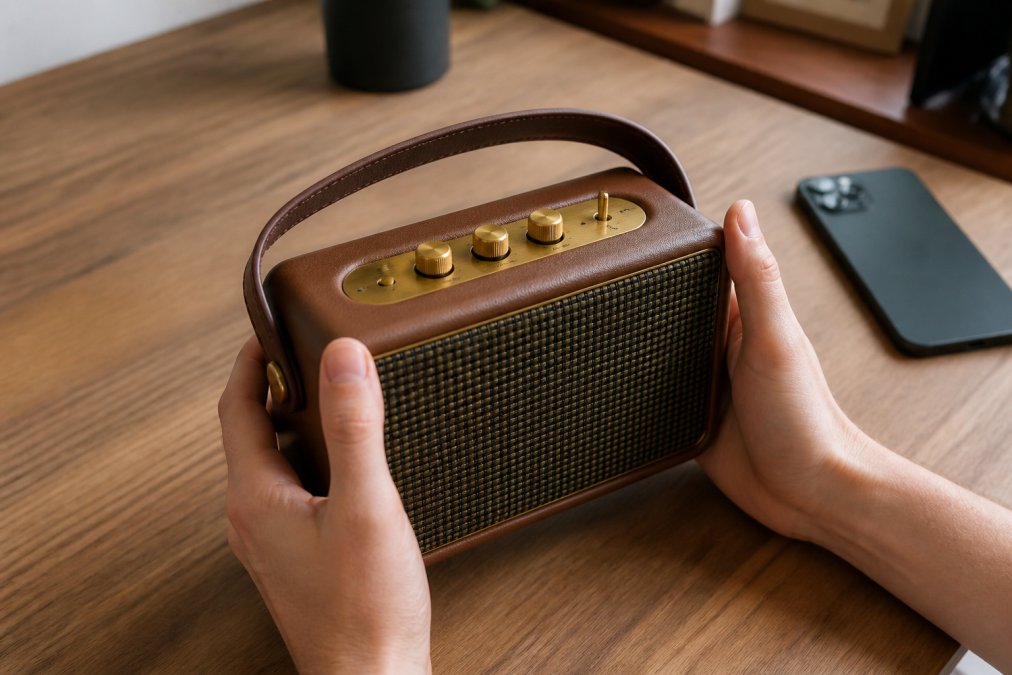
For music lovers and commuters, the practical test is simple: can you pause, skip, and change volume without looking? Gadgets built around that principle, like the Mini Retro White Noise Bluetooth Speaker, combine nostalgic aesthetics with controls you can operate by feel. That's the balance worth paying for.

If you want a tactile control on something unexpected, the Smart Fingerprint Padlock replaces a fiddly combination dial with a single touch sensor, a good example of how input design evolves while keeping the physical interaction intact.

Frequently Asked Questions
What are the benefits of using tactile switches?
Tactile switches provide sensory confirmation, so you know a command registered without looking. This improves input accuracy and reduces accidental presses. For gadgets, this means faster operation, less frustration, and better usability in low-light or high-motion situations. They also offer mechanical reliability and consistent actuation force, which many users find more satisfying than flat touchscreens.
Are tactile controls more durable than touch-based interfaces?
Often, yes. Mechanical switches are tested for millions of presses and can outlast the device itself. Touchscreens rely on glass and digitizers that can crack or fail. However, durability depends on build quality. A well-made tactile control panel resists dust, moisture, and impact better than a fragile touchscreen, making it ideal for portable gadgets used during travel or workouts.
How does tactile feedback improve user accessibility?
Tactile feedback is crucial for visually impaired users who rely on touch to identify controls. Physical buttons with distinct shapes and textures allow blind operation. For users with motor impairments, the resistance of a tactile switch can prevent accidental activation. This makes gadgets more inclusive and easier to use for everyone, regardless of ability.
Why are physical buttons making a comeback in modern electronics?
Consumers and designers are recognizing the limits of touchscreens. Physical buttons reduce cognitive load, offer better ergonomics, and provide reliable operation without looking. In cars, cameras, and audio gear, tactile controls are returning because they improve safety and user satisfaction. The blend of nostalgic aesthetics with modern functionality is driving this trend in 2026.
Modern gadgets keep pushing toward glass, but the devices people actually enjoy using tend to keep a few honest buttons. At Electro Gift Shop, we curate portable audio and everyday tech that blends retro character with controls you can operate without looking, from tactile speakers to touch-activated locks. Explore the collection and find gear that sounds as good as it feels in your hand. Shop Now.