

Best Desktop Gadgets for Music Lovers: 2026 Desk Setup
Table of Contents
- How to Build a Desktop Audio Setup That Sounds Better Than Your Phone
- Compact Desktop Speakers: Small Size, Full Sound
- The Best Desktop DAC for Music: Why Your Computer's Sound Card Falls Short
- Aesthetic Desk Accessories for Musicians: Style That Earns Its Place
- Desktop Gadgets for Music Lovers Who Need Quiet: Headphones and Beyond
- Cable Management and Connectivity: The Unsung Hero of a Clean Desk
- Which Desktop Gadgets Are Worth Your Money?
- Conclusion: Build a Desk Setup That Makes You Want to Listen
- Frequently Asked Questions
Last Updated: September 8, 2026
Building a desktop audio setup that genuinely outperforms your phone is less about spending a fortune and more about making deliberate choices. The best desktop gadgets for music lovers solve a specific problem: your laptop or phone's built-in speakers and headphone jacks are engineering compromises, not tools for serious listening. When you sit down to work or unwind, the difference between a stock setup and one built with intention is immediately audible, from the clarity of a vocalist's breath to the weight of a kick drum. This guide from Electro Gift Shop walks through the desktop gadgets for music that deliver real fidelity, practical utility, and a workspace you will actually enjoy inhabiting.
The core principle is that desktop audio is a system, not a single purchase. A quality speaker is only as good as the signal it receives, and a great pair of headphones is wasted on a noisy environment. By focusing on a few high-impact upgrades, you can reach a level of sound quality that makes listening an event rather than a background task. Below, we break down the categories that matter most, the specifications that separate good gear from great gear, and how to integrate everything into a clean, functional desk setup.
How to Build a Desktop Audio Setup That Sounds Better Than Your Phone
The fastest upgrade you can make is to stop using your computer's internal sound card as your primary source. Desktop gadgets for music rely on a clean signal path. A dedicated digital-to-analog converter (DAC) bypasses the electrically noisy interior of your computer, which is a common source of static and interference (audiosciencereview.com). Many entry-level DACs also include a headphone amplifier, which provides the clean power needed to drive higher-impedance headphones to their full potential.
Your listening environment matters just as much as the hardware. Hard surfaces reflect sound and create comb filtering, which muddies the frequency response. A simple rug, a bookshelf with varied items, or acoustic foam panels on the wall behind your monitors can dramatically tighten the soundstage. Positioning is equally critical: place your speakers so the tweeters point directly at your ears, forming an equilateral triangle with your head. This setup ensures you hear the stereo image as the artist and engineer intended, with accurate instrument placement and depth.
Compact Desktop Speakers: Small Size, Full Sound
Compact desktop speakers are the cornerstone of any serious listening station, and the market has evolved far beyond the tinny computer speakers of the past. The ideal pair for a desk offers a balanced frequency response, a separate tweeter and woofer, and the ability to fill a small room without distortion at moderate volumes. You are looking for a speaker that can reproduce a full acoustic track with clarity, not just thump through bass-heavy playlists.
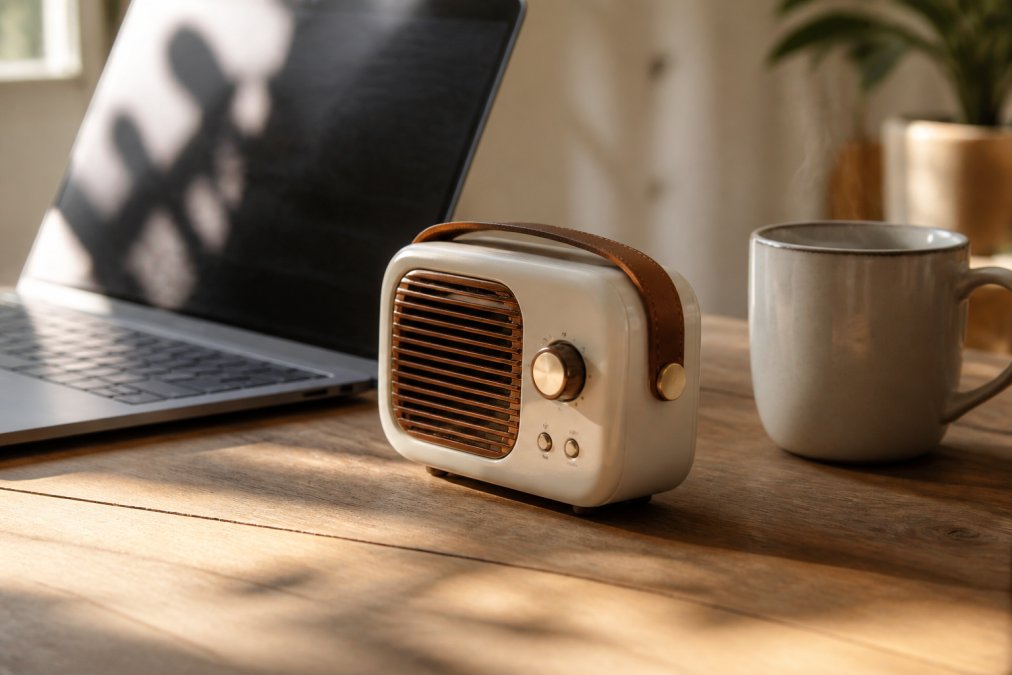
The Electro Gift Shop Mini Retro White Noise Bluetooth Speaker is a versatile entry point that blends nostalgia with modern utility. At $37.99, it delivers high-quality audio alongside built-in nature sounds and RGB ambient lighting, making it a multifunctional hub for both focused listening and ambient background noise. Its portable design means it can move from your desk to a nightstand without missing a beat, and the wireless connectivity keeps your workspace free of clutter.

When comparing compact speakers, pay close attention to the stated frequency range and power output. A speaker that claims to reach down to 60 Hz will offer more bass presence than one that stops at 120 Hz. For a desktop, you rarely need floor-shaking volume, but you do need headroom so the amplifier does not clip during dynamic passages. Look for a speaker with a dedicated subwoofer output if you want to add low-end extension later without replacing your main units.
However, frequency response numbers only tell part of the story. The driver configuration matters just as much. A two-way design with a dedicated tweeter and woofer will almost always outperform a single full-range driver at the same price, because it can separate the high frequencies from the mid and low frequencies, reducing intermodulation distortion. If you see a speaker advertised as "full-range" with only one driver, be skeptical of its ability to produce crisp highs and defined bass simultaneously at higher volumes.
Another key differentiator is the amplifier class. Many budget desktop speakers use Class D amplifiers, which are efficient and run cool, but they can sound harsh if poorly implemented (soundguys.com). Class AB amplifiers, often found in higher-end studio monitors, deliver a warmer, more natural midrange but generate more heat and consume more power. For a desktop setup where you are sitting close to the speakers, the difference is audible in the upper mids, the region where vocal sibilance and cymbal crashes live. A harsh Class D implementation can make these frequencies fatiguing after an hour of listening.
Placement is the final piece of the puzzle. Your speakers should be at ear level, angled slightly inward toward your listening position, and at least a few inches away from the wall behind them. If they are too close to the wall, the bass will be exaggerated and boomy due to boundary reinforcement. If they are placed on the same desk surface as your computer, consider isolating them with foam pads or small stands. This decouples the speaker from the desk, preventing vibrations from muddying the low end and reducing resonance that can be picked up by your keyboard or monitor.
For those who want to go beyond basic stereo, a 2.1 setup, two satellite speakers plus a dedicated subwoofer, is the most practical upgrade path. A subwoofer handles everything below 80 Hz, freeing your main speakers from the burden of reproducing deep bass (hifiengine.com). This results in cleaner mids and a more defined soundstage. When integrating a subwoofer, set the crossover frequency around 80 Hz and adjust the phase to match your main speakers. You will know it is correct when the bass sounds like it is coming from the speakers themselves, not from a box on the floor.
If you are considering a speaker with a built-in DAC, be aware that not all DACs are created equal. Some budget speakers include a basic DAC that adds noise or limits the sample rate to 48 kHz. If you are feeding the speaker from a dedicated external DAC, you can bypass the built-in one by using the analog input. This gives you the best of both worlds: the convenience of a powered speaker with the signal quality of a separate DAC.
The Best Desktop DAC for Music: Why Your Computer's Sound Card Falls Short
A desktop DAC for music is the single most impactful upgrade for anyone using wired headphones or powered speakers. Your computer's integrated sound card handles audio as a secondary task, often resulting in high latency, audible noise, and a restricted dynamic range. An external DAC moves the digital-to-analog conversion outside the chassis, isolating it from electromagnetic interference and providing a cleaner, more stable voltage supply.
The best desktop DAC for music beginners is one that offers plug-and-play functionality with a clear upgrade path. You want a unit with a USB input for your computer, a line-out for powered speakers, and a headphone jack with its own amplifier stage. This configuration allows you to use the DAC as the central hub of your entire audio setup, switching between speakers and headphones without unplugging cables. Look for a chipset that supports high bitrate audio, such as 24-bit/192kHz, to ensure you are hearing every detail in your lossless files.
For those just starting, the priority is a clean signal path, not the most expensive chip on the market. A well-implemented budget DAC will outperform a poorly implemented high-end one. Read reviews that mention measured performance, not just subjective impressions, to understand how well a unit handles signal processing and harmonic distortion.
Aesthetic Desk Accessories for Musicians: Style That Earns Its Place
Aesthetic desk accessories for musicians must balance form and function; a desk that looks great but is a nightmare to use will quickly lose its appeal. The goal is to create a space that signals your passion and supports your workflow. This means choosing items that reduce friction, like cable organizers that keep your signal path clean, and display pieces that resonate with your musical taste without becoming distractions.
The retro-modern design language is popular for a reason: it combines the analog warmth of vintage gear with the reliability of modern components. A vintage-style volume knob or a set of wooden headphones can add character to a sterile office environment. However, the best aesthetic choices are those that also serve a purpose. A quality headphone stand, for example, protects your investment and keeps your primary listening tool within arm's reach, while a small, dedicated desk lamp with a warm bulb can reduce screen glare and create a more focused listening atmosphere.
What most gift-guide listicles miss is that the aesthetic of your desk is inseparable from your workflow efficiency. If you are a music lover who produces, edits, or even just curates playlists at a desk, every accessory should earn its place by reducing the distance between your hands and your tools. The most visually appealing desk is one where the gear is organized by frequency of use, your primary controller or volume knob within a hand's reach, your secondary devices on a riser, and your rarely used cables tucked away in a drawer.
A common pattern among serious desktop audio enthusiasts is the use of angled monitor stands. These not only improve your viewing posture but also free up valuable desk space underneath for a MIDI controller or a compact audio interface. When you raise your monitors, you also create a natural channel for routing cables behind them, keeping the front of your desk visually clean. Pair this with a cable management tray mounted under the desk surface; it hides power strips and excess cable length while keeping everything accessible for reconfiguration.
For the musician who wants to display their passion without creating clutter, consider a wall-mounted guitar hanger or a vinyl record frame. These items turn your instruments and album art into decor, but they also serve a practical function: they keep your instruments safe from being knocked over and your records off the desk where they could collect dust or get scratched. A small, dedicated shelf above your desk for your turntable or your favorite audio books can also serve as a visual anchor for the space.
Another overlooked element is the tactile feel of your controls. If your primary interface is a mouse and keyboard, adding a high-quality, weighted volume knob or a set of tactile foot pedals for transport control can dramatically improve your workflow. These accessories feel substantial and intentional, and they reduce the need to reach for your screen or your audio interface. The aesthetic benefit is that they look like professional studio gear, not consumer plastic.
Lighting is the final layer of desk aesthetics. A bias light behind your monitor reduces eye strain and improves perceived contrast, which is especially important during late-night listening sessions. An RGB strip under the desk can provide ambient glow without reflecting off your screen. If you want to match the lighting to your music, look for a smart bulb or a light strip that can sync to audio input, this turns your entire desk into a visualizer without adding a separate device to your desk surface.
For those who want a cohesive look without buying a full matching set, focus on a single material accent, wood, brushed aluminum, or matte black, and repeat it across your headphone stand, your monitor riser, and your cable clips. This creates visual unity without requiring you to replace all your gear at once. The result is a desk that looks intentional, feels efficient, and supports the way you actually work with music.
Desktop Gadgets for Music Lovers Who Need Quiet: Headphones and Beyond
When you need to be quiet, whether because of roommates, family, or a shared office, your desktop gadgets for music strategy must shift from speakers to headphones. The challenge is finding a pair that delivers high-fidelity sound without causing discomfort during long listening sessions. The key specifications are impedance, sensitivity, and the physical design of the ear cups and headband.
For desktop use, consider an open-back design if you are in a quiet room, as they offer a more natural soundstage. For shared spaces, closed-back headphones provide sound isolation to prevent audio leakage. If you find traditional headphones uncomfortable, especially when lying down or wearing glasses, an alternative form factor is worth considering. The Bluetooth Sleep Headband from Electro Gift Shop offers a unique solution. At $8.99, it features ultra-thin HD stereo speakers and Bluetooth 5.0 connectivity built into a comfortable fabric band, providing a tangle-free listening experience that works for sleep, travel, or relaxation without the pressure of traditional ear cups.

The integration of software and hardware is also part of a quiet setup. Many headphones now come with companion apps that include EQ settings and firmware updates. While a flat response is ideal for critical listening, a slight EQ adjustment can make music more enjoyable for casual sessions. Do not underestimate the importance of a good fit; a headphone that is too tight will cause fatigue, and one that is too loose will leak sound and reduce bass response.
Cable Management and Connectivity: The Unsung Hero of a Clean Desk
Cable management is the difference between a professional setup and a hobbyist's tangle. Every cable in your signal path is an antenna for noise, so keeping them organized is not just about aesthetics; it is about maintaining signal integrity. The goal is to separate power cables from audio cables to prevent electromagnetic interference, which manifests as a low-level hum or buzz.
Invest in a few key items: a cable sleeve or raceway to bundle wires running along the back of your desk, and a small tray or clip to keep the area near your computer's ports tidy. When connecting your DAC to your speakers, use shielded cables of the shortest necessary length. For wireless devices, ensure they support a low-latency codec like aptX Low Latency to avoid the delay between the audio and the video on your screen, which is critical if you are producing content or playing instruments along with a track.
Which Desktop Gadgets Are Worth Your Money?
With so many options, it helps to categorize purchases by their impact on your listening experience. Some upgrades offer immediate, dramatic improvements, while others are incremental. The table below summarizes where your budget delivers the most value.
| Gadget Category | Primary Benefit | Best For | Price Indicator |
|---|---|---|---|
| Dedicated DAC | Cleaner signal, more detail | Anyone using wired headphones | Entry-level is viable |
| Compact Desktop Speakers | Room-filling sound, stereo imaging | Solo listening at a desk | Varies by size/power |
| Quality Headphones | Privacy, sound isolation | Shared spaces, late-night listening | Wide range |
| Cable Management Kit | Reduced noise, cleaner desk | All setups | Low cost, high value |
The desktop gadgets for music that offer the most significant return are the ones that address your specific listening constraints. If you are always worried about disturbing others, a great pair of headphones is a better investment than a more powerful set of speakers. If you have the space and the freedom to play audio aloud, then upgrading your speakers and adding a subwoofer will provide a more visceral experience. For most people, the first purchase should be a DAC, as it improves the quality of every other component in the chain, whether you are using speakers or headphones.
Conclusion: Build a Desk Setup That Makes You Want to Listen
Upgrading your desk setup is a process of identifying the weakest link in your audio chain and replacing it with a purpose-built tool. Start with the source, clean up your signal path, and then address your output method based on your environment. The goal is to create a space where the technology disappears and the music takes center stage.
At Electro Gift Shop, we curate gadgets that blend nostalgic aesthetics with modern functionality, ensuring your desk looks as good as it sounds. Our products, like the Mini Retro Bluetooth Speaker and the Bluetooth Sleep Headband, are designed for reliable performance whether you are working, traveling, or relaxing. We understand that you want gear that sounds genuinely good, not just something that looks nice, which is why we focus on user-friendly devices that deliver crystal-clear audio quality and enhanced daily convenience.
Get started with Electro Gift Shop and build a desk setup that makes you want to listen to every track in your library again.
Frequently Asked Questions
What are the best desktop gadgets for music lovers on a budget?
Start with a compact desktop speaker like the Mini Retro White Noise Bluetooth Speaker at $37.99. It delivers surprisingly full sound for its size and adds ambient lighting to your desk. A Bluetooth sleep headband is another low-cost upgrade at $8.99, giving you private listening without bulky over-ear cans. These two items cover most listening needs without the expense of a full separate audio stack.
Do I need a desktop DAC if I have a good sound card?
If your computer has a dedicated sound card, a desktop DAC still helps. Most built-in sound cards are cramped inside a case full of electrical interference, which degrades the signal. An external DAC moves that processing outside, resulting in a cleaner signal and better dynamic range. You will notice the difference most with high-impedance headphones or studio monitors, where the built-in amp in your computer often runs out of headroom.
What is the best way to improve my desktop audio setup?
Start with the source and work outward. First, connect a desktop DAC to bypass your computer's weak internal sound card. Then pair it with compact desktop speakers positioned at ear level, angled toward you. If you use headphones, a sleep headband offers a comfortable alternative for long sessions. Finally, manage your cables and add acoustic treatment behind the speakers to tighten the bass response.
Are retro-styled gadgets worth buying, or just for looks?
Retro styling does not mean outdated performance. The Mini Retro White Noise Bluetooth Speaker, for example, uses modern Bluetooth 5.0 for stable wireless connectivity while keeping a vintage look. It also includes built-in nature sounds and RGB lighting, features you won't find on vintage gear. The aesthetic is a bonus, not a substitute for the digital-to-analog converter and drivers inside.