

How to Prevent Audio Gear Damage: 2026 Maintenance Guide
Table of Contents
- Audio Equipment Surge Protection: Stop Voltage Spikes Before They Fry Your Gear
- How to Protect Speakers from Clipping and Signal Distortion
- Power Sequencing: The Right Order to Turn Gear On and Off
- Storing Audio Gear in Hot Weather: Temperature and Humidity Control
- Cleaning and Dust Removal: Simple Habits That Extend Equipment Life
- Cable Management, Strain Relief, and Connector Care
- Transport and Vibration Damage: Protecting Portable Audio Gear on the Move
- Long-Term Storage and Software-Side Protection for Audio Equipment
- DIY Repair vs. Professional Service
- Conclusion: Small Habits That Prevent Big Audio Gear Damage
- Frequently Asked Questions
Last Updated: September 20, 2026
Audio Equipment Surge Protection: Stop Voltage Spikes Before They Fry Your Gear
A single power surge can kill a speaker in under a second. That is the hard truth about how to prevent audio gear damage: most failures start at the wall socket, not the driver, and the right habits prevent audio gear damage before it starts. This guide from Electro Gift Shop walks through the habits that keep your gear alive for years.
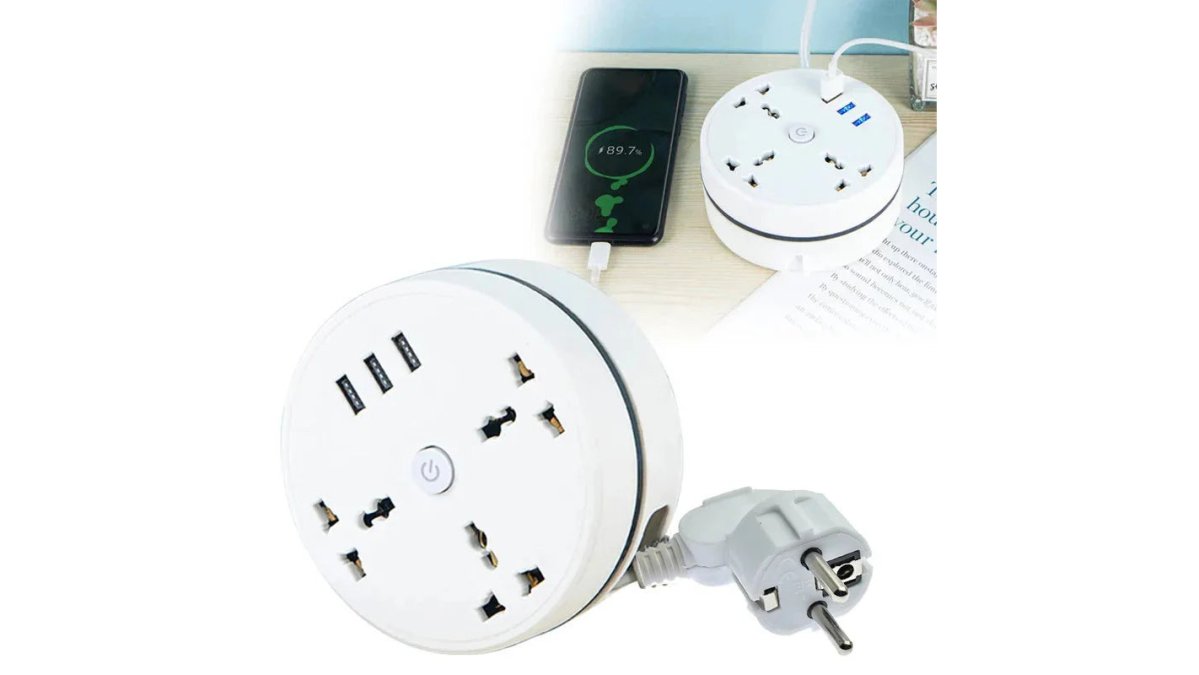
Surges come from storms, old wiring, and even your fridge kicking on. A cheap strip with a breaker helps. A real surge protector does more.

Surge Protectors vs. Power Conditioners: What Your Setup Actually Needs
A surge protector is a strip that blocks sudden voltage spikes before they reach your gear. A power conditioner goes further: it smooths everyday voltage fluctuations and filters electrical noise that can muddy your sound.
For most home setups, a surge protector is enough. For studios with sensitive gear, a conditioner earns its place.
| Device | What It Stops | Best For |
|---|---|---|
| Basic power strip | Nothing (just adds outlets) | Charging phones |
| Surge protector | Electrical spikes | Home speakers, desks |
| Power conditioner | Spikes, voltage sag, noise | Studios, powered monitors |
The U.S. Department of Energy guide to surge protectors explains how joule ratings work. Higher joules mean more protection.
How to Protect Speakers from Clipping and Signal Distortion
Clipping is the top silent killer of speakers. It happens when an amp pushes more power than a speaker can handle, and the waveform flattens into a harsh square shape. That squared signal overheats voice coils fast.
So how do you protect speakers from clipping? Turn the amp up last, not first. Set your source volume low, then raise the amp gain until it is loud enough.
Gain Staging Basics That Prevent Clipping Damage
Gain staging means setting volume levels across every step of the signal path. Get it right and you never hit clipping.
- Start with the source (phone, laptop) at 70-80%
- Set the audio interface or mixer to unity gain
- Raise the amp or powered monitors last
- Watch for distortion, then back off a notch
A common mistake is cranking the source to 100% and blaming the speakers. The distortion starts upstream.
Power Sequencing: The Right Order to Turn Gear On and Off
Power sequencing means turning gear on and off in a set order. Get it backwards and you can send a loud pop through your speakers, or worse, a DC spike that damages drivers. The order matters because each device in your signal chain has its own power supply, and the moment a device powers up or down, it can send a transient voltage down the line.
Turn on: source first, then mixer, then amp or powered speakers. Turn off: reverse it. Amp off first, source last.
That pop you hear when you flip a switch? It is a DC spike hitting the drivers. When an amplifier powers on, its internal capacitors charge and can briefly send a DC offset to the outputs. If the speakers are already on, that offset hits the voice coil as a thump. Over time, repeated thumps stress the driver suspension and can lead to premature failure. Sequencing avoids this by ensuring the amp is the last thing on and the first thing off.
Many powered monitors and interfaces now handle this automatically with soft-start circuits. These circuits ramp up the output slowly or mute the output until the power supply stabilizes. If yours does not, do it by hand. Check your manual, if it mentions "soft start," "pop suppression," or "delayed output," you may not need to worry. But for older or budget gear, manual sequencing is cheap insurance.
What to Do If You Forget the Order
We all forget. If you accidentally turn on the amp first, you might hear a pop. That single pop is unlikely to kill a speaker, but repeated mistakes add up. If you hear a loud pop, turn everything off immediately and restart in the correct order. If the pop is accompanied by a burning smell or a channel cuts out, stop and inspect your gear.
Sequencing with Power Conditioners and Surge Protectors
If you use a power conditioner, it may have sequenced outlets, some models delay power to certain outlets to enforce the correct order automatically. This is common in rack-mounted conditioners for studios. For home setups, a simple surge protector does not sequence; you still need to do it manually. Never plug your amp into a switched outlet on a surge protector and turn it on before your source.
Grounding and Power Sequencing
A ground loop can make sequencing worse. If your gear shares a ground path through two routes, say, through the power cable and through an audio cable, you can get a hum or buzz that gets amplified when you turn on the amp. A ground loop isolator breaks the loop. But the best fix is to plug all your audio gear into the same outlet or power conditioner, so they share a single ground reference. This also reduces the chance of voltage differences between devices that can cause pops.
Quick Reference: Power-On and Power-Off Order
- Power on: Source (computer, phone, turntable) → Mixer/interface → Amplifier or powered speakers
- Power off: Amplifier or powered speakers → Mixer/interface → Source
If you have outboard gear like effects units or equalizers, turn them on after the source but before the amp. Turn them off after the amp but before the source. The rule is simple: signal flows from source to speakers, so power flows in the same direction on, and opposite on off.
Storing Audio Gear in Hot Weather: Temperature and Humidity Control
Heat and moisture are quiet destroyers. Storing audio gear in hot weather speeds up capacitor aging and warps speaker cones. Humidity adds corrosion on connectors and circuit boards.
Keep gear between 18°C and 24°C when possible. Aim for 40-60% relative humidity. A cheap hygrometer tells you where you stand.
- Never leave gear in a parked car in summer
- Avoid garages and attics with wild temperature swings
- Use a dehumidifier in damp rooms
- Let cold gear warm up before powering on
That last point matters. Bringing a cold speaker into a warm room can cause condensation inside. Wait an hour.
Cleaning and Dust Removal: Simple Habits That Extend Equipment Life
Dust builds up on vents and heat sinks, and that traps heat. Trapped heat causes thermal throttling and shortens component life.
Clean every few months with these steps:
- Unplug everything first
- Use compressed air on vents and grilles
- Wipe surfaces with a dry microfiber cloth
- Clean connectors with a contact cleaner like Deoxit
- Never spray liquid directly into gear
For fabric-covered speakers, a soft brush lifts dust without pushing it in.
Cable Management, Strain Relief, and Connector Care
Cables fail more often than speakers do. The usual cause is strain, not age.
Strain relief means supporting the cable so the connector never takes the pull. Loop cables loosely. Never yank a jack out by the wire.
- Use velcro ties, not tight zip ties
- Leave a small service loop at each connector
- Check for oxidation on older jacks
- Match impedance when swapping cables
Connector oxidation shows up as crackling or a channel cutting out. A quick clean with contact spray usually fixes it.
A ground loop causes a low hum. It happens when gear shares a ground path through two routes. A ground loop isolator breaks it.
Transport and Vibration Damage: Protecting Portable Audio Gear on the Move
Vibration is the enemy of portable gear. Constant shaking loosens solder joints and can shift drivers out of alignment.
For travel, follow these rules:
- Use a padded case with foam cutouts
- Remove cables before packing
- Never stack heavy items on top
- Keep speakers upright in transit
If you are coming from a desk setup, expect portable gear to take more abuse. That is why rugged builds matter.
The Mini Retro White Noise Bluetooth Speaker from Electro Gift Shop is built for this kind of life. It is compact at 5.6 x 6 x 2.64 inches and runs 4-6 hours on a 1500mAh battery, so it travels well.

OSHA guidance on vibration exposure covers how vibration affects equipment over time.
Long-Term Storage and Software-Side Protection for Audio Equipment
Long-term storage needs more than a shelf. Moisture, dust, and heat all work against you when gear sits idle for months. Most guides focus on active use, but how you store gear during downtime can determine whether it powers up again. This section covers the software-side habits that prevent hardware damage.
Long-Term Storage Protocols: Capacitors, Batteries, and Desiccants
When gear sits unused, its electrolytic capacitors can degrade. These components store energy and filter power, and they rely on a thin oxide layer that can break down if not exposed to voltage regularly. The result: reduced performance or failure when you power on. To mitigate this, power up stored gear every few months for 30 minutes. This "reforming" process helps maintain capacitor health. If you cannot do that, consider a capacitor reformer tool, but for most home users, periodic power-ups are enough. Maintaining the internal integrity of electronic components mirrors the care required for wooden instruments, where preventing structural failure remains essential for preserving long-term playability.
Batteries are another risk. Lithium-ion batteries should be stored at around 50% charge, never full, never empty. A full charge stresses the battery and can cause swelling; a depleted charge can drop below the minimum voltage and become unrecoverable. For gear with removable batteries, take them out entirely. For built-in batteries, check the charge every few months and top up to 50% if needed. Disposable batteries (AA, AAA) should always be removed to prevent leakage that corrodes contacts.
Moisture is the silent killer. Use a sealed storage bin with silica gel packs. Desiccant packs absorb humidity and need to be recharged or replaced periodically, most change color when saturated. Aim for 40-60% relative humidity. A cheap hygrometer inside the bin tells you if you need more desiccant. Avoid plastic bags that trap moisture; breathable cloth covers are better for dust protection while allowing air circulation.
Software-Side Protection: Limiter Settings and Gain Staging
Software can prevent hardware damage. A limiter is a processor that stops signal peaks from exceeding a set threshold. If you use a digital audio workstation (DAW) or a mixer with built-in processing, set a limiter on the output bus before the signal reaches your amp or speakers. This prevents accidental clipping from sudden loud noises, a dropped microphone, a feedback loop, or a software glitch. Set the threshold just below the clipping point of your amp or speakers. For most home setups, -3 dBFS is a safe starting point.
Gain staging in software matters too. If you crank the source volume in your DAW to 100% and then boost the amp, you are asking for distortion. Keep software output levels at 70-80% and use the amp gain to reach the desired loudness. This gives you headroom for unexpected peaks. Many DAWs have a "safe mode" or output limiter you can enable. Use it.
Firmware updates fix bugs that can cause overheating or sudden shutdowns. But before any update, back up your presets and settings. A failed update can brick a device, and without a backup, you lose all your custom configurations. Check the manufacturer's instructions, some devices require a specific sequence or a USB connection. Never interrupt a firmware update.
Storage Checklist
- Store in a sealed bin with silica gel packs
- Keep batteries at 50% charge, never full or empty
- Remove disposable batteries entirely
- Cover gear with a breathable cloth, not plastic
- Power up every 3-6 months for 30 minutes
- Back up presets before firmware updates
- Set a software limiter at -3 dBFS
DIY Repair vs. Professional Service
Some fixes are easy. Others are not.
- DIY: cleaning connectors, replacing cables, updating firmware
- Pro service: blown drivers, failed capacitors, board-level repair
If you smell burning or see a bulging capacitor, stop. Unplug it and call a technician.
Conclusion: Small Habits That Prevent Big Audio Gear Damage
Most audio gear does not die from one big event. It dies from small, repeated stresses: a surge here, a hot car there, a dusty vent nobody cleaned.
The good news is that prevention is cheap. A surge protector, a cleaning routine, and careful transport cover most of the risk.
At Electro Gift Shop, we build gear for people who move around and want their sound to hold up. Our portable speakers and audio gadgets are designed to travel, not sit on a shelf. Sarah L. put it simply: "This gadget is so handy and works flawlessly."
Get started with Electro Gift Shop and keep your audio gear sounding great for years.
Frequently Asked Questions
What is the 83% rule for speakers?
The 83% rule is a guideline for matching amplifier power to speaker power handling. It suggests choosing an amplifier rated at roughly 83% of your speaker's continuous power rating. This leaves headroom so the amp never strains into clipping, which is the main cause of blown tweeters. For example, a speaker rated at 100 watts continuous pairs well with an 80-85 watt amplifier. The goal is clean power delivery, not maximum volume.
Does clipping actually ruin speakers?
Yes. Clipping happens when an amplifier is pushed beyond its clean output limit, flattening the waveform peaks. Those flattened signals send excess high-frequency energy to tweeters, which heat up and fail. You will often hear distortion before damage occurs, so turn the volume down when sound turns harsh or muddy. Proper gain staging and enough amplifier headroom are the two best ways to prevent audio gear damage from clipping.
Is it safe to leave audio equipment on 24/7?
It depends on the gear. Many solid-state amplifiers and powered monitors are designed to run for long periods, but constant power means constant heat, which shortens capacitor life over time. If you leave equipment on, ensure good ventilation and keep it away from direct sunlight. For portable speakers and headphones, power them down when not in use. A surge protector with a switch makes it easy to cut power during storms or long absences.
How do I protect portable speakers during travel?
Use a padded case or wrap the speaker in soft fabric before packing it. Avoid tossing it loose in a bag where cables and hard objects can press against the drivers. Keep it out of checked luggage if possible, since vibration and impact damage are common causes of audio gear failure. For hot climates, never leave gear in a parked car. A compact Bluetooth speaker like the Mini Retro White Noise Bluetooth Speaker fits easily into a padded pouch for safe transport.
Your gear is only as reliable as the habits around it. Electro Gift Shop offers portable, stylish audio devices built for daily life, with features like compact designs, long battery life, and rugged builds that handle real use. Shop the collection and find gear that fits how you actually listen.