

Are Retro Gadgets User Friendly Today? A 2026 Guide
Table of Contents
- Why Retro Gadgets Are Making a Comeback in 2026
- Retro Style Speakers with Modern Sound: Where Form Meets Function
- The Benefits of Analog Technology in a Digital World
- How Modern Manufacturers Update Retro Designs for Today's Users
- Compatibility Check: Do Retro Gadgets Work with Modern Devices?
- Accessibility and Usability Challenges You Should Know
- Environmental Impact of Retro Tech: E-Waste and Longevity
- Security Risks of Legacy Hardware and How to Mitigate Them
-
Step-by-Step Modernization Guide for Your Retro Gadgets
- What You'll Need
- Step 1: Identify Your Connection Options [Time: 10 minutes]
- Step 2: Test the Wired Path First [Time: 10 minutes]
- Step 3: Add Bluetooth If Needed [Time: 15 minutes]
- Step 4: Update Firmware Where Supported [Time: 10 minutes]
- Step 5: Isolate and Document [Time: 10 minutes]
- Common Pitfalls and How to Avoid Them
- Frequently Asked Questions
Last Updated: September 16, 2026
Why Retro Gadgets Are Making a Comeback in 2026
Are retro gadgets user friendly today? The honest answer is yes, more than most people expect, because modern manufacturers have quietly rebuilt the internals while keeping the shell that made you fall in love with the design in the first place. This guide from Electro Gift Shop examines what actually works, what still creates friction, and how to modernize a vintage-inspired device without losing its character.
The comeback is not a niche trend. Thrift stores, flea markets, and online marketplaces have all seen sustained interest in older hardware, and mainstream electronics makers have responded by shipping new products in retro casings. What changed is not nostalgia itself, but the fact that a retro-styled device can now connect to the same streaming services and Bluetooth accessories as everything else on your desk.
That combination is what makes the category genuinely usable rather than merely decorative.
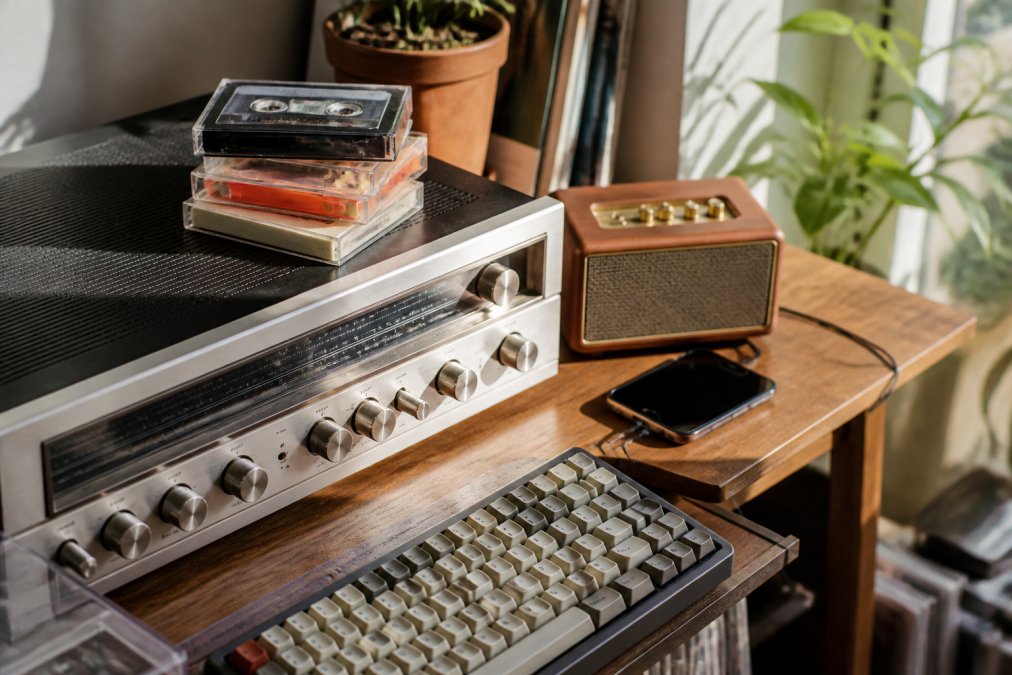
The Nostalgia Factor and Gen Z Appeal
Younger buyers are driving much of this demand. For people who grew up entirely on touchscreens, physical media and tactile controls feel novel rather than dated. Cassette tapes, instant film, and wired headphones all carry a throwback appeal that a flat glass slab cannot replicate.
The appeal is partly aesthetic and partly sensory. Turning a real knob, hearing a mechanical keyboard click, or watching a film advance creates feedback that digital interfaces removed in the name of convenience.
Digital Detox and Intentional Living
A second force is intentional living. Many buyers want a device that does one job well instead of a screen that does everything and demands constant attention.
Retro gadgets fit that goal neatly. A dedicated music player or a single-purpose camera removes the temptation to check notifications every few minutes. The device becomes a tool again, not a portal.
Retro Style Speakers with Modern Sound: Where Form Meets Function
Retro style speakers with modern sound are the clearest example of the hybrid approach working. You get the wood grain, the fabric grille, and the chunky knobs of a 1970s stereo, but the internals are Bluetooth 5.0, rechargeable lithium batteries, and drivers tuned for contemporary music.
The Mini Retro White Noise Bluetooth Speaker is a good illustration of how far this has come. It measures 142 x 153 x 67 mm and weighs 498 g, so it sits comfortably on a bedside table or slips into a bag. It pairs over Bluetooth 5.0 within a 10-metre range, and it also accepts AUX input and TF cards for anyone who still keeps music on physical media.

The 5W output delivers 360-degree surround sound, and the 1500mAh battery runs for 4-6 hours on a single charge, refilling in 2-3 hours over USB. There is also a dedicated white noise mode with four built-in nature sounds, plus an RGB ambient light that rotates with the music. At $37.99, it is a one-time purchase with no subscription attached.
What to Look for in a Hybrid Speaker
Not every retro-styled speaker deserves a spot on your shelf. A few specifications separate the ones that last from the ones that end up in a drawer.
| What to Check | Why It Matters | Target Spec |
|---|---|---|
| Bluetooth version | Older chips drop connection and add latency | Bluetooth 5.0 or newer |
| Battery capacity | Determines real-world playtime | 1500mAh or higher |
| Input options | Fallback when wireless fails | AUX or TF card slot |
| Output power | Volume ceiling before distortion | 5W minimum for a small room |
| Weight and size | Portability versus desk presence | Under 600g for travel |
The Benefits of Analog Technology in a Digital World
The benefits of analog technology come down to three things: tactile control, durability, and the absence of software dependencies. A physical knob cannot crash. A wired connection cannot drop. A device with no firmware update cycle cannot be abandoned by its manufacturer.
That last point matters more than it sounds. Legacy hardware that never needed an app still works exactly as designed, while app-dependent gadgets can become useless when a company shuts down its servers. The trade-off is real, though. Analog devices rarely offer voice assistants, cloud sync, or multi-room audio, and anyone who needs those features will find the retro route limiting.
Why Analog Still Works: The Mechanics Behind the Reliability
The reliability of analog isn't magic, it's a direct result of fewer failure points. A turntable's speed is governed by a motor and a belt or direct drive, not a firmware update. A cassette deck's playback head reads magnetic tape, a physical medium that doesn't require a driver. When you press a mechanical key on a vintage typewriter or a modern mechanical keyboard, the switch actuates a physical contact; there is no debounce algorithm to fail.
This simplicity extends to repair. A loose wire can be soldered. A worn belt can be replaced. A capacitor can be swapped. In contrast, a modern smart speaker with a sealed enclosure and proprietary software often cannot be repaired at all, if the manufacturer stops supporting the app, the device becomes e-waste.
The Accessibility Angle: Who Actually Benefits from Tactile Controls
Accessibility is the gap most retro tech coverage skips entirely. Physical controls are a genuine advantage for some users and a genuine barrier for others, and it is worth being honest about both.
On the positive side, tactile interfaces help people who struggle with capacitive touchscreens. A raised knob or a physical button gives feedback that a flat panel cannot, and it can be operated without looking. For users with visual impairments, a tactile dial with distinct detents can be more usable than a smooth touch slider. For those with motor control challenges, a large, chunky button requires less precision than a small on-screen target.
The problems are equally concrete. Small labels on vintage equipment are hard to read. Dense button layouts on old handheld consoles assume fine motor control. Devices with no screen reader support or no adjustable display settings exclude users who rely on those features. Retro-styled products that keep modern accessibility options, such as adjustable brightness or a screen-off function, are the ones worth prioritizing.
The Trade-Offs You Can't Ignore
Analog isn't universally better. It lacks the convenience of voice control, the scalability of multi-room audio, and the seamless integration with streaming services that modern users expect. A vinyl record requires cleaning and careful handling; a cassette tape can stretch or snap. Analog devices often have a higher noise floor and narrower dynamic range than digital equivalents. For someone who wants to ask a speaker to play a song from any room, analog is the wrong tool.
The key is to match the tool to the task. If your priority is longevity, repairability, and a focused, tactile experience, analog wins. If your priority is convenience, integration, and features, digital wins. Many enthusiasts use both: a vintage turntable for intentional listening sessions and a smart speaker for background music.
How Modern Manufacturers Update Retro Designs for Today's Users
Manufacturers have settled on a consistent playbook: keep the exterior, replace everything inside. The result is a device that looks like it belongs in 1975 and behaves like it shipped last month.
Typical updates include firmware that supports modern Bluetooth codecs, USB-C or standard USB charging in place of proprietary bricks, rechargeable batteries instead of disposable cells, and driver support published for current operating systems. Some brands also add companion apps, though the better designs treat the app as optional rather than mandatory.
A common mistake buyers make is assuming that a retro look means retro limitations. In practice, the opposite is usually true: the retro shell is a design choice, and the engineering underneath is current.
Compatibility Check: Do Retro Gadgets Work with Modern Devices?
Compatibility is where retro gadgets either earn their place or get returned. Most modern retro-styled devices work with current phones, laptops, and tablets without any special setup, but the details matter depending on how you plan to connect.
Bluetooth Integration and Streaming Services
Bluetooth integration is the default path and the one that causes the fewest problems. A modern retro speaker or handheld console pairs with a phone in seconds, and streaming services work normally because the audio is handled by the phone, not the device.
Watch for older Bluetooth versions. Anything below 5.0 tends to introduce noticeable lag, which is fine for music but frustrating for video. Check the spec sheet before buying rather than after.
Proprietary Cables and Driver Support
This is the friction point that catches people out. Genuine vintage hardware often uses proprietary cables that are no longer manufactured, and older peripherals may lack driver support for current operating systems.
Mini Retro White Noise Bluetooth Speaker →
Modern retro-styled products largely avoid this. The Mini SLR-Shaped 1080P Pocket DV Camera, for example, charges and transfers over a standard USB interface and stores footage on an SD or TF card between 8GB and 128GB, so there is no proprietary dock or software suite to worry about. At $29.99, it records 1080P full HD video with one-click operation and eight built-in filters, with loop recording that overwrites the oldest footage once the card fills.

Accessibility and Usability Challenges You Should Know
Accessibility is the gap most retro tech coverage skips entirely. Physical controls are a genuine advantage for some users and a genuine barrier for others, and it is worth being honest about both.
On the positive side, tactile interfaces help people who struggle with capacitive touchscreens. A raised knob or a physical button gives feedback that a flat panel cannot, and it can be operated without looking.
The problems are equally concrete. Small labels on vintage equipment are hard to read. Dense button layouts on old handheld consoles assume fine motor control. Devices with no screen reader support or no adjustable display settings exclude users who rely on those features. Retro-styled products that keep modern accessibility options, such as adjustable brightness or a screen-off function, are the ones worth prioritizing.
Environmental Impact of Retro Tech: E-Waste and Longevity
The environmental case for retro tech comes with caveats. Every device that stays in use for a long time is a device that does not need to be manufactured, shipped, and eventually replaced.
Repairability is the key variable. Hardware with standard screws, replaceable batteries, and widely available parts can be maintained almost indefinitely. Hardware sealed with glue and proprietary fasteners cannot, regardless of how it looks.
The caveat is energy.
Security Risks of Legacy Hardware and How to Mitigate Them
Legacy hardware carries real security exposure, and this is the angle almost no buying guide addresses. Devices that stopped receiving firmware updates years ago may contain unpatched vulnerabilities that will never be fixed (Device security guidance | Managing deployed devices | Obsolete products).
Practical mitigations are straightforward:
- Keep legacy devices off your primary network, or isolate them on a guest network
- Never reuse a password across a legacy device and a modern account
- Avoid storing sensitive data on old hardware with no encryption support
- Prefer modern retro-styled products, which ship with current firmware and an update path
Step-by-Step Modernization Guide for Your Retro Gadgets
Modernizing a retro gadget is a short project, not a rebuild. Work through these steps in order and most compatibility problems resolve themselves. This guide focuses on the practical friction points that other articles skip, like which specific adapters work, how to handle driver issues, and when to give up on a legacy device.
Total Time: 45-60 minutes Difficulty: Beginner
What You'll Need
- Your retro device and its original power supply
- A Bluetooth transmitter if the device has no wireless built-in (e.g., a 3.5mm AUX transmitter or an RCA transmitter)
- The correct cable type for your device's input (3.5mm AUX, RCA, USB, HDMI, or DIN)
- A phone or laptop to test the connection
- A guest network if the device connects to Wi-Fi
Step 1: Identify Your Connection Options [Time: 10 minutes]
Check which inputs the device accepts. AUX, USB, HDMI, and TF card slots all work, but each needs a different adapter. Write down exactly what ports you have before buying anything. Common vintage inputs include 3.5mm headphone jacks, RCA jacks (red/white/yellow), DIN connectors (common on older Bang & Olufsen and some European brands), and proprietary multi-pin docks. If you see a port you don't recognize, search the model number online, forums like Reddit's r/vintageaudio often have pinout diagrams.
Expected Result: A clear list of available inputs and the adapters required.
Step 2: Test the Wired Path First [Time: 10 minutes]
Connect with a cable before attempting wireless. A wired connection confirms the device works and isolates whether any problem is with the hardware or the Bluetooth link. For audio, use a 3.5mm to RCA cable if your device has RCA inputs. For video, an HDMI to composite adapter can connect older consoles to modern TVs, though you may need a scaler to avoid lag. If the wired connection fails, the issue is likely the device itself or a blown fuse, not the adapter.
Expected Result: Audio or video output confirmed over a physical connection.
Step 3: Add Bluetooth If Needed [Time: 15 minutes]
If the device has no wireless built-in, a plug-in Bluetooth transmitter converts any AUX or RCA input into a wireless receiver. Pair it once and the device behaves like a modern speaker. Look for transmitters with Bluetooth 5.0 or newer to avoid latency. For turntables, you may need a phono preamp before the transmitter if your turntable doesn't have a built-in preamp. For vintage stereos with only speaker wire outputs, you can use a speaker-level to line-level converter, but this is more advanced and may introduce noise.
Expected Result: The retro device appears in your phone's Bluetooth list and pairs successfully.
Step 4: Update Firmware Where Supported [Time: 10 minutes]
Check the manufacturer's site for current firmware. Modern retro-styled products usually publish updates; genuine vintage hardware usually does not, which is itself useful information. If the device is a modern retro-styled product (like a new cassette player with Bluetooth), check for firmware updates that might improve codec support or fix bugs. If it's genuine vintage, firmware updates are almost never available, plan accordingly and avoid connecting it to sensitive networks.
Expected Result: Firmware confirmed current, or confirmed unavailable.
Step 5: Isolate and Document [Time: 10 minutes]
If the device connects to a network, move it to a guest network and record the password you assign. Keep a note of the cable type and any adapters so future you does not have to work it out again. For devices that only connect via Bluetooth, there's no network risk, but you should still document the pairing process. If the device has a companion app, check whether it requires an account and whether it works offline. Some apps phone home; if privacy is a concern, use a guest network or block the device's internet access at the router level.
Expected Result: Device connected, secured, and documented.
Common Pitfalls and How to Avoid Them
- Proprietary cables: Some vintage devices use cables that are no longer manufactured. Before buying, search for the cable type. If it's proprietary and unavailable, consider a replacement device.
- Driver incompatibility: Older peripherals (like scanners or printers) may lack drivers for Windows 11 or macOS Sonoma. Check manufacturer support pages or community forums before assuming it will work.
- Latency in Bluetooth: For video, Bluetooth audio can lag. Use wired connections or Bluetooth 5.0+ with low-latency codecs like aptX LL.
- Power issues: Vintage devices may require specific voltages or polarity. Using the wrong power supply can damage the device. Always match voltage and polarity exactly.
For buyers who want a portable projector without the compatibility headaches, the Salange P300 Mini Portable Projector runs Android 11 with dual-band 2.4G and 5G WiFi, so streaming apps work directly on the device with no dongle required. It supports native 720P with decoding up to 8K, projects between 40 and 130 inches with automatic keystone correction, and includes Bluetooth 5.1 for pairing with external speakers or headphones. At $80.99, it includes a remote, power cable, and manual.

Frequently Asked Questions
Are retro-style speakers compatible with modern streaming services?
Yes, many retro-style speakers include Bluetooth 5.0 or AUX inputs, so they work with Spotify, Apple Music, and other streaming apps. For example, the Mini Retro White Noise Bluetooth Speaker connects wirelessly within 10 meters and also supports TF cards. Check for Bluetooth version and input options before buying, because older vintage gear may lack these features entirely.
Is Gen Z driving the trend toward retro technology?
Gen Z is a major force behind the retro revival, drawn to tactile controls, physical media, and digital detox habits. They seek out instant film cameras, wired headphones, and cassette tapes as alternatives to touchscreen fatigue. This generation values intentional living and aesthetic appeal, which makes vintage-inspired gadgets feel fresh rather than dated. Their spending power is pushing manufacturers to blend nostalgia with modern functionality.
What are the benefits of using vintage tech in a modern world?
Vintage tech offers tactile feedback, durability, and a break from notification overload. Analog controls like knobs and switches are often easier to use without looking, which helps during workouts or driving. Many retro devices also last longer and are repairable, reducing e-waste. The main trade-off is compatibility: you may need adapters or Bluetooth transmitters to connect legacy hardware to current phones and laptops.
Are retro gadgets actually user-friendly, or is the design just for show?
It depends on the model. Well-designed retro gadgets keep physical controls simple: one knob for volume, one for mode, no confusing app required. The Mini Retro White Noise Bluetooth Speaker uses knobs and a tap-to-wake display, so you can operate it in the dark. Avoid gadgets that rely on proprietary apps with poor reviews, and test return policies if you buy online without trying first.