

Best Desk Gadgets for Professionals in 2026
Table of Contents
- Why the Right Desk Gadgets Matter for Productivity
- Quick Comparison: Top Desk Gadgets for Professionals
- Metal Expansion Phone Stand: Best for Multitasking
- EU Plug Smart Power Strip: Best for Charging Stations
- Mini Retro White Noise Bluetooth Speaker: Best Compact Desktop Speakers
- How to Set Up a Productive Home Office
- Small-Space and Minimalist Desk Optimization
- Neurodivergent-Friendly and Sustainable Desk Gear
- Which Desk Gadgets Should You Pick?
- Frequently Asked Questions
Last Updated: October 4, 2026
Why the Right Desk Gadgets Matter for Productivity
The average professional now juggles a laptop, a phone, a tablet, and a tangle of charging cables at the same desk. That chaos costs time. The right desk gadgets for professionals fix it by giving every device a home, keeping your phone visible without stealing focus, and turning a cramped surface into a workspace that actually supports deep work. At Electro Gift Shop, we curate gadgets that blend retro looks with modern function, so your setup works as well as it looks.
This guide covers the three picks we recommend most, plus how to set up a productive home office and how to handle small-space or sensory-friendly setups. Below, we break down pricing, best use cases, and the trade-offs most listicles skip.
Quick Comparison: Top Desk Gadgets for Professionals
Here is the short version. All three picks come from our own catalog, so prices are exact, not estimates.
| Gadget | Price | Best For | Key Feature |
|---|---|---|---|
| Metal Expansion Phone Stand | $13.99 | Multitasking | 15W fast charging, magnetic grip |
| EU Plug Smart Power Strip | $16.99 | Charging stations | Multiple AC outlets plus USB ports |
| Mini Retro White Noise Speaker | $37.99 | Compact desktop speakers | 4 nature sounds, RGB ambient light |
If you only buy one thing, start with the phone stand. It is the cheapest fix for the most common desk problem: a phone that keeps pulling your eyes away from your screen.

Metal Expansion Phone Stand: Best for Multitasking
The Metal Expansion Phone Stand is the best desk gadget for multitasking because it keeps your phone visible and charged without adding clutter. It mounts magnetically to your laptop or a Tesla display, so notifications stay in view while your hands stay on the keyboard. At $13.99, it costs less than most single-purpose phone holders.
The magnetic base holds firm, which matters if you are moving between a desk and a car. A common mistake is buying a flimsy clip-on stand that slips the moment you tilt your screen. This one is built from durable metal and folds flat when you travel.
EU Plug Smart Power Strip: Best for Charging Stations
A charging station only works if it has enough outlets for everything you own. The EU Plug AC Outlet Smart Power Strip packs multiple AC outlets and fast USB ports into a round, compact body, so you can charge a laptop, phone, tablet, and lamp from one spot. It sells for $16.99.

Cable management is where most desks fall apart. This strip helps because the round shape takes up less surface area than a long rectangular bar, and the USB ports mean fewer wall adapters cluttering your desk. It also includes overcurrent and surge protection, which matters if your building's wiring is unpredictable.
Mini Retro White Noise Bluetooth Speaker: Best Compact Desktop Speakers
Compact desktop speakers usually force a choice: small enough to fit, or good enough to enjoy. The Mini Retro White Noise Bluetooth Speaker aims for both. It measures 142 x 153 x 67 mm, so it sits comfortably beside a monitor, and it delivers 360-degree surround sound.

What sets it apart is the dual purpose. It plays music over Bluetooth 5.0, AUX, or a TF card, and it also runs four built-in nature sounds: ocean waves, crackling bonfires, insects and birds, and flowing streams. That makes it a focus tool as much as a speaker. The RGB ambient breathing light rotates with your music, and a screen-off function kills glare at night.
The 1500mAh battery runs 4-6 hours per charge and refills in 2-3 hours over USB. At $37.99, it is the priciest pick here, but it replaces two devices: a speaker and a white noise machine.
How to Set Up a Productive Home Office
A productive home office comes down to three things: a clear surface, a single charging point, and tools that reduce friction instead of adding it. You do not need a big budget. You need a plan that accounts for how you actually work, including whether you focus better with background noise, need visual calm, or lose track of time without cues.
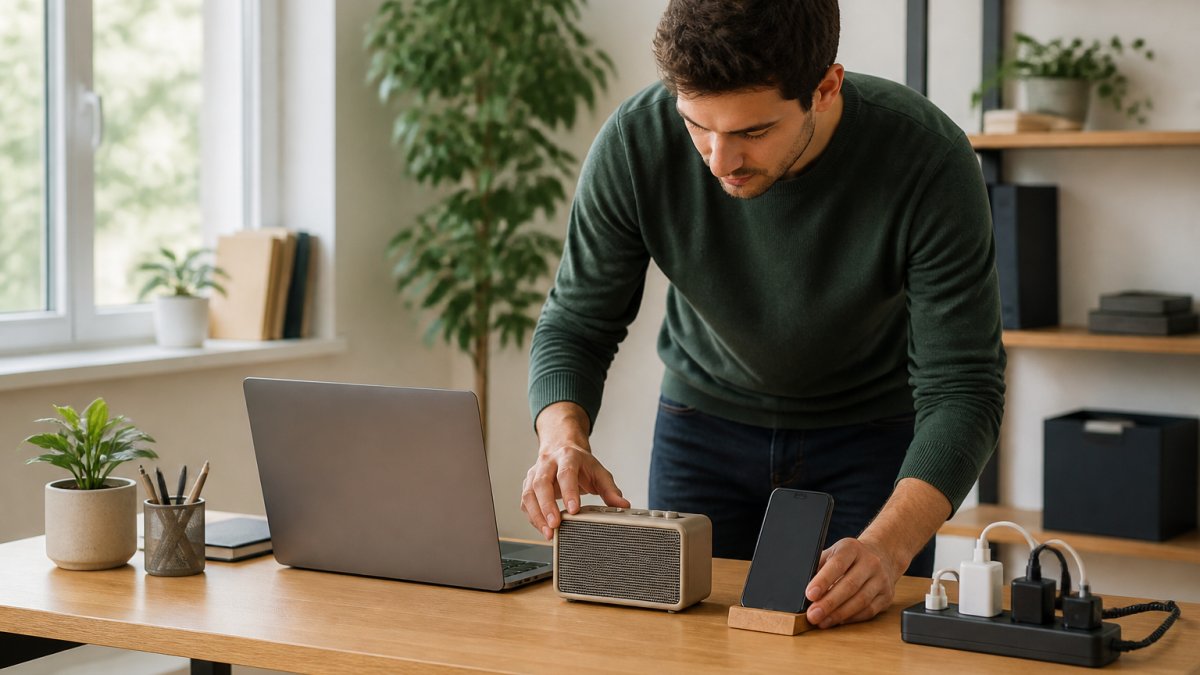
Start by clearing everything off the desk. Then add back only what you use daily. The sequence below is adapted for a single-desk apartment setup:
- Position your laptop or monitor at eye level, roughly an arm's length away. If you use a laptop all day, a riser plus an external keyboard is the cheapest way to stop hunching. A monitor arm frees the surface underneath for a keyboard or notebook.
- Place your charging station on the side you reach with your non-dominant hand. This keeps your dominant hand free for mouse work and stops you from knocking over a drink when you plug in.
- Mount your phone stand where you can see notifications without turning your head far. The goal is a glance, not a turn.
- Set your speaker behind or beside the monitor, not in front of it. Sound should reach you without occupying prime desk real estate.
- Route cables along the back edge and clip them together so they stay put. A cable tray under the desk or a set of adhesive clips costs very little and removes the visual noise that makes a desk feel chaotic.
Workflow automation helps here too. If your power strip connects to a smart home system, you can schedule charging windows and cut standby drain. The goal is a desk you can sit at and forget about.
The neurodivergent-friendly layer most guides skip
If you have ADHD or sensory sensitivities, the standard 'clear surface' advice is not enough. Three adjustments make a measurable difference:
- Control glare, not just brightness. A screen bar or a speaker with a dimmable ambient light lets you work without harsh overheads. Flicker and blue-heavy light are common focus disrupters.
- Use consistent background sound. White noise or nature sounds mask unpredictable office chatter, which is harder to ignore than a steady hum. The four nature sounds on the Mini Retro speaker give you a repeatable audio cue that says 'focus time'.
- Add a visual timer. A small analog timer or an hourglass on the desk gives a concrete sense of time passing, which helps with time blindness. It costs almost nothing and takes no outlet.
A note on lighting and temperature
Desk lamps are not just decor. A lamp with adjustable color temperature lets you shift from cool light in the morning (better for alertness) to warm light in the evening (better for winding down). If your desk sits near a window, position the lamp opposite the window so you are not working in your own shadow. A single adjustable lamp can reduce reflections on the monitor.
What to skip
Do not buy a gadget because it looks good in a photo. The most common mistake is buying a second monitor before fixing the ergonomics of the first one. Fix posture, cable clutter, and lighting first. Then add peripherals. A desk that supports your body and your attention will do more for productivity than any single accessory.
Metal Expansion Phone Stand for Laptop and Tesla Vehicles - Magnetic Folding →
Small-Space and Minimalist Desk Optimization
Most 'best desk gadgets' lists assume you have a 60-inch desk and a spare wall. If you work from a studio apartment, a shared bedroom, or a converted closet, that advice does not apply. This section is for micro-offices, desks under 40 inches wide, often against a wall or in a corner.
The rule we use: every item must earn its footprint, or it goes. A phone stand that doubles as a charger earns its spot. A power strip with built-in USB ports replaces three wall adapters, so it earns its spot too. But the real gains come from three moves.
1. Go vertical before you go horizontal
A monitor riser lifts your screen and creates storage underneath for a keyboard or notebook. Look for one with a built-in drawer or shelf, it replaces a desk organizer and a monitor stand in one footprint. If your desk is against a wall, a wall-mounted shelf above the monitor holds speakers, plants, or a lamp without touching the surface. Command strips or a single bracket are enough for lightweight items; do not drill into a rental wall if you can avoid it.
2. Use the underside of the desk
This is the most underused space in a small office. An under-desk cable tray or a simple adhesive hook holds your power strip, keeping it off the floor and out of sight. A small under-desk drawer (the kind that mounts with two screws) stores pens, cables, and adapters that would otherwise clutter the surface. If you cannot mount anything, a fabric cable sleeve along the back edge does the same job for wires.
3. Choose multi-purpose gadgets over single-purpose ones
In a micro-office, a gadget that does two jobs is worth more than two gadgets that each do one. Examples:
- A phone stand with wireless charging replaces a stand and a charging cable.
- A Bluetooth speaker with white noise replaces a speaker and a separate sound machine.
- A power strip with USB-C and USB-A ports replaces a wall adapter and a charging brick.
This is where the 'minimalist' label earns its keep. Minimalist does not mean empty. It means intentional. Three well-chosen gadgets beat ten impulse buys every time, and in a small space, they also beat ten gadgets that each need their own outlet.
A note on measurements
Before you buy anything, measure your desk depth. Many 'compact' monitor risers are 9 to 10 inches deep, which leaves no room for a keyboard on a 20-inch-deep desk. Look for risers under 8 inches deep, or use a laptop stand that folds flat when not in use. The same applies to speakers: a 5W speaker like the Mini Retro (142 x 153 x 67 mm) fits beside a monitor where a full-size bookshelf speaker would not.
Neurodivergent-Friendly and Sustainable Desk Gear
Most desk gadget guides ignore two groups: people with sensory sensitivities and people trying to buy less disposable tech. Both deserve a section, so here it is.
For sensory-friendly setups, ambient lighting matters more than most guides admit. A screen bar or a speaker with a dimmable light lets you control glare without harsh overheads. White noise is another practical tool: the four nature sounds on the Mini Retro speaker give you a consistent background that masks office chatter, which helps when focus is hard to hold.
On the sustainable side, buy fewer things that last longer. A metal phone stand outlasts a plastic one. A power strip with surge protection protects devices you already own, which cuts replacement waste. Durability is the most underrated eco feature in desk gear.
Which Desk Gadgets Should You Pick?
Match the gadget to the problem, not the other way around.
- Phone distraction and multitasking: Metal Expansion Phone Stand ($13.99)
- Too many chargers, not enough outlets: EU Plug Smart Power Strip ($16.99)
- Noise, focus, and desktop audio: Mini Retro White Noise Speaker ($37.99)
If you work from a laptop and a phone all day, the phone stand delivers the biggest change for the smallest spend. If your desk looks like a cable yard sale, the power strip fixes it in one move. If you need both sound and quiet, the speaker covers both jobs.
Frequently Asked Questions
What are the best desk gadgets to increase productivity?
The most effective desk gadgets for professionals solve specific friction points. A magnetic phone stand keeps notifications visible without cluttering your workspace. A smart power strip with USB ports eliminates adapter hunting. Compact desktop speakers with built-in white noise help mask office distractions. Each gadget should earn its place by removing a daily annoyance, not just adding another device to manage.
How can I organize my professional desk setup?
Start by grouping devices by function: charging, audio, and display. Use a power strip with multiple AC outlets and USB ports to consolidate charging in one spot. Mount your phone on a stand rather than leaving it flat. Route cables behind your desk with clips. A clutter-free surface reduces visual noise and makes it easier to focus on actual work.
Are compact desktop speakers worth it for a professional workspace?
Yes, if you value audio quality without sacrificing desk space. Compact desktop speakers like the Mini Retro White Noise Bluetooth Speaker deliver 360-degree surround sound, plus built-in nature sounds for focus or relaxation. They measure just 142 x 153 x 67 mm, so they fit beside a monitor without crowding your workspace. For professionals who listen to music or need white noise to concentrate, they replace phone speakers and bulky audio systems.
What desk accessories do I actually need for work?
Focus on three categories: power, ergonomics, and audio. A smart power strip with surge protection keeps your devices charged safely. A phone stand reduces neck strain and keeps your screen visible during calls. A compact speaker improves audio for meetings or music. Skip decorative items that don't serve a function. The goal is a workspace where every object has a purpose and nothing competes for your attention.
A cluttered desk quietly drains focus, and fixing it usually costs less than a lunch. Electro Gift Shop builds gadgets that combine nostalgic design with modern function, from a magnetic phone stand with 15W fast charging to a smart power strip with surge protection and a retro speaker with four nature sounds and ambient lighting. Start with the one that solves your biggest daily annoyance, and build from there.