

Why Use a Dedicated Portable DAC: A 2026 Guide
Table of Contents
- Why Use Dedicated Portable DAC: The Basics
- Do I Need an External DAC for Headphones?
- Portable DAC vs Headphone Amp: What's the Difference?
- Does a DAC Improve Sound Quality? Separating Fact From Hype
- Matching Headphones to Your Portable DAC
- Best Portable DAC for Beginners: What to Look For
- How to Connect a Portable DAC to Your Phone or Laptop
- Battery Life, Heat, and Everyday Portability Trade-Offs
- Conclusion: Is a Dedicated Portable DAC Right for You?
- Frequently Asked Questions
Last Updated: October 5, 2026
Why Use Dedicated Portable DAC: The Basics
A dedicated portable DAC is a small external device that converts digital audio into an analog signal your headphones can actually play. Your phone already does this job with a chip inside it. So why carry a second box?
Because that tiny chip sits next to a cellular radio, a battery, and a processor fighting for space. A portable DAC moves the conversion outside that noisy environment. The result is a cleaner signal, more headroom, and often more detail than your phone can deliver alone.
Here is the short answer to why use dedicated portable DAC hardware at all:
- Cleaner conversion. Fewer electrical interruptions reach the chip.
- More output power. Hard-to-drive headphones finally get enough current.
- Better volume control. Precise steps instead of coarse jumps.
- Support for hi-res and lossless audio. Higher sample rates play without downsampling.
That is the theory. The practice depends entirely on what you plug in.
How a DAC Converts Digital Audio to Analog
A digital-to-analog converter (DAC) is the component that turns a stream of numbers into a continuously varying voltage that drives a speaker or headphone driver.
Digital audio files, whether streamed or stored, are just samples: measurements of a sound wave captured thousands of times per second. A DAC reads those samples and rebuilds the wave. The quality of that rebuild depends on the chip, the clock timing, and how little electrical noise reaches the circuit.
A phone's internal DAC is a compromise. It shares a board with radios, cameras, and power management. A dedicated unit isolates the conversion and feeds it clean power. That isolation is the whole point.
Do I Need an External DAC for Headphones?
You need an external DAC for headphones only if something in your current chain is actually limiting the sound. If your headphones are easy to drive and your phone sounds fine, an external DAC solves a problem you do not have.
The honest test is simple. Plug your headphones into your phone and listen at a comfortable volume. Now ask:
- Does the sound feel thin or lifeless?
- Do you hear hiss, buzz, or clicks between tracks?
- Does the bass collapse when the music gets busy?
- Do you have to push the volume near maximum to get loud enough?
- Do quiet passages lose detail?
Two or more yes answers suggest your phone's output is the weak link. Zero yes answers means you should spend your money elsewhere.
Signs Your Phone's Internal DAC Is Holding You Back
The clearest sign is insufficient volume, not tone. If your headphones need near-maximum volume to reach a normal listening level, the amplifier section is running out of headroom. When an amp runs out of headroom, it distorts.
Other signals show up in specific situations:
- Busy passages turn muddy. Dense mixes collapse when the amp cannot supply current fast enough.
- Background noise appears. Hiss or a faint buzz points to electrical interference.
- Bass feels soft. Weak amplification often shows up first in low frequencies.
- Volume steps jump too far. Coarse digital steps make quiet listening impossible.
A phone that struggles with one pair of headphones may drive another pair perfectly. That is a headphone problem as much as a phone problem. We cover matching below.
Portable DAC vs Headphone Amp: What's the Difference?
A portable DAC converts digital audio to analog. A headphone amp takes an analog signal and makes it stronger. Many portable devices combine both into one unit, often called a DAC/amp.
The distinction matters when you shop, because you may only need one half of the pair.
| Device | What It Does | When You Need It |
|---|---|---|
| DAC only | Converts digital to analog | Phone output is noisy but loud enough |
| Amp only | Boosts an analog signal | Source is clean but too quiet |
| DAC/amp combo | Converts and amplifies | Most common portable solution |
| Dongle DAC | Small inline converter | Commuting, minimal bulk |
A DAC/amp is the practical choice for most people. It handles the full chain from your phone's USB port to your headphones in one box. Buying a DAC alone only helps if your phone already has a clean, powerful analog output, which is rare.
Here is the part most guides skip: a combo unit is not automatically better than two separate devices. It is simply more convenient. Convenience is usually the right trade for portable use.
Does a DAC Improve Sound Quality? Separating Fact From Hype
A DAC can improve sound quality, but only when it removes a specific limitation. It cannot create detail that was never in the recording, and it cannot fix bad headphones. The useful question is not "does a DAC sound better?" but "is my current chain measurably limiting what I hear?"
This is where marketing gets ahead of physics. A new DAC does not add warmth, air, or musicality. It either passes the signal cleanly or it does not. What you hear as "improvement" is usually one of three things:
- Lower noise floor. Less hiss means quiet passages emerge.
- More power. Adequate current tightens bass and control.
- Cleaner clocking. Better timing reduces smearing in complex tracks.
If your current setup already measures clean and plays loud enough, a new DAC will sound nearly identical. That is not a flaw. It means the original chain was fine.
How to Run a Level-Matched Comparison at Home
Most listening comparisons are invalid because the louder source sounds better. That is not a subtle effect; it is one of the most reliable findings in audio perception research, and it is why reviewers who do not level-match their sources routinely "hear" differences that vanish under controlled conditions. Achieving this same level of rigorous signal control is equally vital when integrating premium car audio DSPs into a vehicle environment to ensure that frequency response remains accurate regardless of the playback volume.
You can run a fair test yourself in about 20 minutes:
- Pick one track you know well. Use a lossless file if you have one, and note a specific 10-15 second passage.
- Set both sources to the same loudness. Play a steady tone or a consistent passage through each and adjust volume until they match by ear. A phone sound-level meter app is enough for a rough match.
- Switch without knowing which is playing. Have someone else swap the cable, or close your eyes and let a helper alternate. Sight bias is real.
- Repeat the same passage several times. One listen proves nothing. Five or six alternations reveal whether a difference is consistent or imagined.
- Write down what changed, if anything. "More bass" is not a finding. "The kick drum decay is audible on source B but masked on source A" is.
A common pattern is that differences shrink dramatically once levels match. If they do not shrink, you have found a real limitation worth fixing.
The Numbers That Actually Predict an Audible Difference
Specs do not tell the whole story, but a device with poor numbers will not sound clean no matter how it looks. Four figures matter most when you are deciding whether an upgrade will be audible:
- Signal-to-noise ratio (SNR). Higher is better. It tells you how far noise sits below the music. A phone output with audible hiss on sensitive IEMs is often sitting in a range where a dedicated DAC's higher SNR is the entire reason it sounds cleaner.
- Total harmonic distortion plus noise (THD+N). Lower is better. It measures how much the device alters the signal. Distortion that rises sharply as volume climbs is the classic sign of an amp running out of headroom.
- Output power at a given impedance. This decides whether your headphones get loud enough. Power is usually quoted at 32 ohms; a device rated for 32 ohms may deliver far less into 300 ohms.
- Output impedance. Lower is generally better for matching many headphones. A high output impedance can shift the frequency response of low-impedance, low-sensitivity headphones in ways you can hear.
None of these numbers guarantees a better experience. But when one of them is clearly limiting your current setup, the upgrade is no longer a matter of taste.
Noise, Distortion, and Clean Amplification Explained
Noise is any unwanted signal added to your audio. It shows up as hiss, hum, or buzz. Distortion is any change to the shape of the original waveform, and it usually rises as volume climbs.
Good portable gear keeps both low while still delivering enough output power for your headphones. That balance is what "clean amplification" actually means. A device with a great SNR but too little power for your headphones will still sound strained; a device with plenty of power but a noisy output stage will hiss on sensitive IEMs. The right device is the one whose weakest spec is still better than what your headphones need.
Matching Headphones to Your Portable DAC
Headphone matching decides more of your final sound than the DAC chip itself. Two numbers matter: impedance and sensitivity. Impedance is electrical resistance, measured in ohms. Sensitivity measures how loud a headphone gets for a given amount of power, usually quoted in dB per milliwatt (dB/mW) or dB per volt (dB/V).
Impedance alone is a poor predictor. A 300-ohm headphone with high sensitivity can be easier to drive than a 32-ohm headphone with low sensitivity. The pair of numbers together tells you what your amp actually has to deliver.
Reading Impedance and Sensitivity Together
Use this as a rough guide, but treat it as a starting point rather than a rule:
- Under 32 ohms, high sensitivity (above roughly 110 dB/mW): Your phone is probably fine. A DAC adds little beyond a cleaner noise floor.
- 32-80 ohms, moderate sensitivity: A portable DAC/amp usually helps with dynamics and headroom, especially on busy passages.
- Over 80 ohms, or low sensitivity (below roughly 100 dB/mW): You need real output power. A phone will struggle, and the struggle shows up as compressed dynamics and early distortion.
There is a trap here. Very low-impedance, high-sensitivity earphones can actually pick up more hiss from a powerful amp than from a phone. Match the amp to the headphone, not to the price tag. If your IEMs are rated around 16 ohms and 115 dB/mW, a high-gain desktop-style portable amp is the wrong tool.
Output Power, Not Just Output Voltage
Manufacturers often quote power at 32 ohms because it produces an impressive-looking number. But power into a load is not constant across impedances. A device that delivers plenty of power into 32 ohms may deliver a fraction of that into 300 ohms, because higher impedance draws less current for the same voltage.
What this means in practice:
- Low-impedance, low-sensitivity headphones need current. Look for power ratings at or near their impedance.
- High-impedance headphones need voltage swing. A device with a high output-voltage ceiling will drive them better than one rated only for high current into low loads.
- Planar magnetic headphones often sit in a middle zone: moderate impedance, low sensitivity. They reward amps with both voltage and current headroom.
A useful sanity check: if your headphones need near-maximum volume on your phone to reach a comfortable level, the amp section is already near its limit, and distortion is likely rising before you notice it.
Balanced vs Single-Ended Outputs
Many portable DAC/amps offer a balanced output alongside the standard single-ended 3.5 mm jack. Balanced connections use separate signal paths for the left and right channels and typically deliver roughly double the voltage swing of the single-ended output on the same device.
That extra voltage can matter for high-impedance headphones, where voltage swing is the limiting factor. For low-impedance, high-sensitivity IEMs, the benefit is usually smaller and the higher gain can make hiss more audible. Balanced is not automatically better; it is a tool that helps specific headphones.
A few practical notes:
- Balanced cables are usually specific to the device's connector, so check compatibility before buying.
- Some devices only reach their full power rating on the balanced output.
- The single-ended output on a good device is often perfectly adequate for easy-to-drive headphones.
A Quick Matching Workflow
- Look up your headphone's impedance and sensitivity. Both numbers are usually on the spec sheet or the manufacturer's product page.
- Estimate how loud they get from your current source. If you routinely listen above roughly 80% volume, you are near the limit.
- Check the DAC/amp's power rating at or near your headphone's impedance. Ignore ratings quoted only at 32 ohms if your headphones are 250 ohms or higher.
- Decide whether you need balanced output. High-impedance headphones benefit most; low-impedance IEMs usually do not.
- Listen before you commit. If you can, try the pairing at a store or buy from a seller with a return window.
Best Portable DAC for Beginners: What to Look For
The best portable DAC for beginners is one that matches your headphones, connects without adapters, and lasts a full day. Everything else is secondary.
Skip the spec sheet for a moment and check these five things in order:
- Connector match. Does it use the same port as your phone, or ship with the right cable?
- Enough power. Can it drive your specific headphones to a comfortable volume?
- Battery or bus power. Does it run from your phone, or does it have its own cell?
- Physical controls. Buttons beat apps when you are walking or on a train.
- Build quality. A metal body survives a bag better than plastic.
For most beginners, a small bus-powered dongle is the right starting point. It draws power from your phone, adds almost no weight, and handles the conversion and amplification in one step. If your headphones are demanding, step up to a unit with its own battery and a proper volume dial.
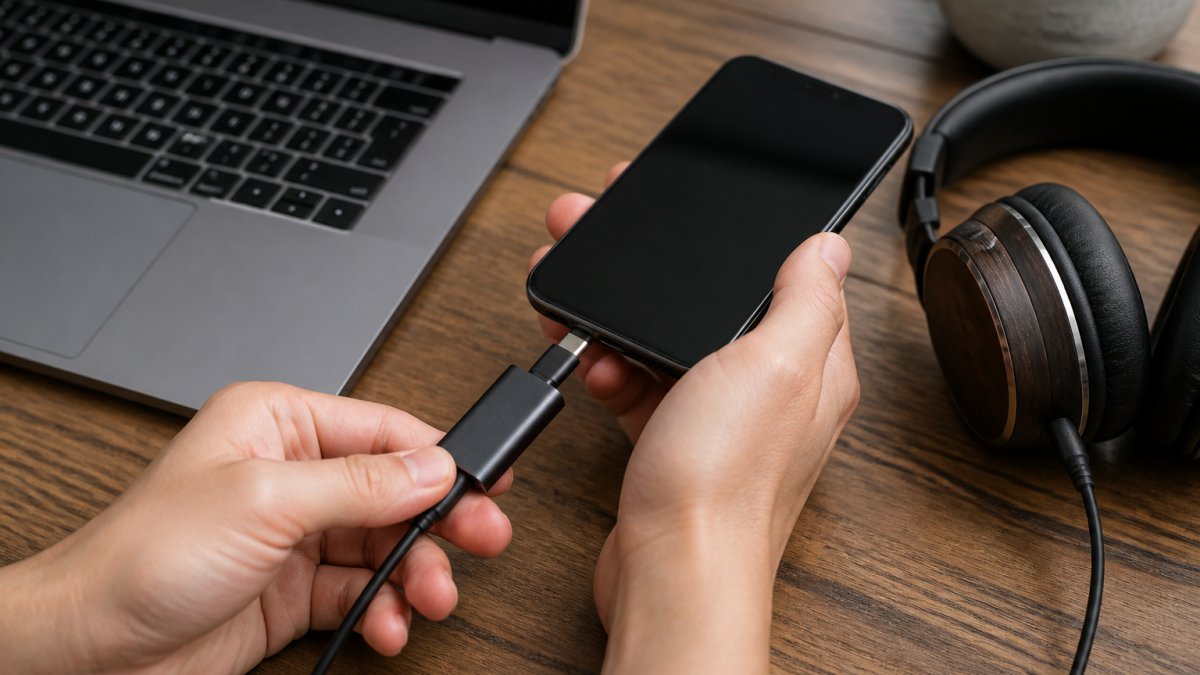
How to Connect a Portable DAC to Your Phone or Laptop
Connecting a portable DAC takes about a minute once you have the right cable. The steps below work for most phones, tablets, and laptops.
Total time: 2-5 minutes Difficulty: Beginner
What you'll need:
- Your portable DAC or DAC/amp
- The correct cable for your source device
- Your headphones
- A music app that supports your audio files
Step 1: Identify your source port. Check whether your phone or laptop uses USB-C, Lightning, or a standard USB-A port. This decides which cable you need.
Step 2: Connect the DAC to your source. Plug the cable into your phone or laptop first. Most portable DACs draw power from the source, so the order matters less than a firm connection.
Step 3: Plug in your headphones. Connect your headphones to the DAC's output jack. Use the correct plug size for your model.
Step 4: Check the output settings. Your device may ask whether to route audio through the new connection. Approve it. Some phones need USB audio enabled in settings.
Step 5: Set volume and listen. Start at a low volume, then raise it gradually. If you hear nothing, unplug and reseat each connection.
Expected result: Audio plays through your headphones with the DAC handling conversion, and your phone's internal chip is bypassed.
Battery Life, Heat, and Everyday Portability Trade-Offs
Portable audio gear always trades something. Battery, heat, and size pull against power and sound quality.
Bus-powered dongles draw from your phone, so they drain your phone battery faster. Units with their own cell last longer but add weight and need charging. Powerful amps run warmer, and a warm device in a pocket is normal, not a defect.
Here is how the trade-offs usually break down:
- Dongle DACs: lightest, no charging, but limited power and phone drain.
- Battery DAC/amps: more power and longer sessions, but bulkier and need their own cable.
- Desktop-style portables: best sound and controls, worst for a commute.
For a commute or the gym, weight and battery matter more than the last bit of output power. For a desk or a long flight, a battery unit earns its space.
Conclusion: Is a Dedicated Portable DAC Right for You?
Buy a dedicated portable DAC if your current setup is genuinely holding your music back. If your headphones are hard to drive, your phone hisses, or the sound collapses at higher volumes, a portable DAC fixes a real problem. If none of that applies, upgrade your headphones first.
At Electro Gift Shop, we built our audio range for exactly this situation: portable, stylish gear that blends nostalgic design with modern performance. Our devices focus on crystal-clear audio quality, portable and lightweight design, and reliable performance for work, play, or travel. Customers like Sarah L. put it simply: "This gadget is so handy and works flawlessly."
Get started with Electro Gift Shop and give your daily listening the clean signal it deserves.
Frequently Asked Questions
What is the purpose of a portable DAC?
A portable DAC converts digital audio files into an analog signal your headphones can play. Your phone has an internal DAC, but it is built to a budget and shares space with other components. A dedicated portable DAC handles that conversion in a separate, shielded unit, which can reduce noise and deliver a cleaner signal to your headphones. It is especially useful for lossless audio files and high-impedance headphones that a phone struggles to drive properly.
Will a portable DAC improve Bluetooth headphones?
No. Bluetooth headphones receive a digital signal wirelessly and convert it internally using their own DAC. A portable DAC only works with wired connections, so it cannot bypass the electronics inside Bluetooth headphones. If you want better sound from Bluetooth, look for codec support like LDAC or aptX instead. For wired earphones or headphones, a portable DAC can make a noticeable difference because it replaces the phone's built-in conversion and amplification stages.
How do I know if my phone needs an external DAC?
If you hear hissing, crackling, or a weak, thin sound when using wired headphones, your phone's internal DAC may be the bottleneck. Other signs include needing to push volume near maximum, hearing distortion at higher levels, or noticing that lossless files sound no different from compressed streams. Phones without a headphone jack require a dongle DAC anyway, so choosing a dedicated portable DAC gives you better conversion than a basic adapter.
When should you use a dedicated portable DAC?
Use one when you listen through wired headphones and want cleaner sound than your phone provides. It makes the most sense for commuters, travellers, and anyone using high-impedance or sensitive in-ear monitors. If you mainly stream compressed audio through wireless earbuds, the benefit is smaller. A portable DAC also helps when your laptop's headphone output picks up electrical noise or lacks enough output power for demanding headphones.